Google recently released the 4.2.2 update of Android Jelleybean and with this returned the old problem of Google Play AppStore giving errors while updating or downloading applications. The most common error encountered by droiders is "Error retrieving information from server rpc:s-5:aec-0". There are two fixes for it. #1 Remove and re-add your Google Account: > Go to Settings and scroll down to the Accounts portion. > Select Google accounts and tap on your email address. If you have more than one Google account for the same tablet then select the primary one with which you access the Play store.
> Now click on the Options button (the one with three vertically stacked dots) and select Remove account.
> Now proceed tor reboot your tablet
> Re-add the same account via the + Add account option in the Accounts section. #2 Some service tweaking: If #1 doesn't solve the problem then you will have to go a little deeper.
>Open the Settings menu and select the Apps option.
> Proceed to the All section here and scroll down and select Google Play Store.
> Force stop this app and then proceed to the Clear data.
> Repeat the same procedure with the Google Services Framework app.
> Reboot the tablet. Note: You will have to repeat #1 after #2.
The route of the Lahore bus transit system is as follows:
1. Gajjumata Terminal
2. Dulu Khurd Bus Stop
3. Youhanabad Bus Stop
4. Nishtar Colony Bus Stop
5. Atari Saroba Bus Stop
6. Kamahan Bus Stop
7. Chungi Amar Sidhu Bus Stop
8. Qainchi Chowk Bus Stop (8A on map)
9. Ghazi Chowk Bus Stop (there is some confusion regarding this stop because there are two bus stops of the same name in the city and as you can see, the one labeled as 8B on the map (near DHA Phase-I one) seems to go way off-route and so it is neglected. Ghazi Bus Chowk is effectively number 9 and 8B is just there to show you that where the second bus stop of the same name exists.)
10. Ittefaq Hospital Bus Stop
11. Naseerabad Bus Stop
12. Model Town Bus Stop
13. Kalma Chowk Bus Stop
14. Qaddafi Stadium Bus Stop
15. Canal Road Bus Stop
16. Ichara Bus Stop
17. Shama Road Bus Stop
18. Qartaba Chowk Bus Stop (Also known as Muzung Chungi Adda)
19. Janazgah Bus Stop
20. MAO College Bus Stop
21. Civil Secretariat Bus Stop
22. Kachery Bus Stop
23. Bhatti Chowk Bus Stop
24. Azadi Chowk Bus Stop
25. Timber Market Bus Stop
26. Niazi Chowk Bus Stop
27. Shahdara Terminal
Its been around 3 months since Youtube was banned in Pakistan, supposedly in the wake of the anti-Muslim film Innocence of Muslims. When the film's trailer got released a load of cavemen came bawling about on the street asking to block Youtube. The government, in its signatory response, decided to block access to Youtube for an indefinite period citing the presence of blasphemous content.
The radical conservatives whose actions catalyzed this extreme response, if researched, would make up only around 2-3% of Pakistan's internet populace. This goes on to show the disproportion of the government's response; shutting down access to the world's premier video sharing site where millions of Pakistanis used to watch educational and entertainment videos.
Well, this ban didn't only lead to negatives. There are some positives as well. The use of free internet proxies like Hotspot and Spotflux flourished in the country, effectively lending government's censorship drive rudderless. Also, local video sharing websites like Tune.pk sprang up much like how the ban on Facebook, back in 2010, lead to Muslim Facebook. However, these websites are an alternative at most, I don't think they will be able to keep up once Youtube is unbanned like MFB faded into obscurity once people had regained access to Facebook.
So, now let's get to the crux of the article, how to access Youtube without those slow and pesky proxy softwares. Hotspot for one, is hated, because they just bombard you with a hell load of ads meanwhile giving abysmal speeds. Spotflux is better, it is faster and doesn't have any weird advertisement windows popping up left and right. Still, nothing beats the convenience of circumventing the turning on proxy part for accessing Youtube - you don't have sit around waiting to connect to the proxy server!
I discovered this procedure by chance, it goes like this:
1) Right-click on the internet icon in the system icons portion of the taskbar. (highlighted in yellow)
2) Select Open Network and Sharing Center. 3) Select Local Area Network.
4) Click on the Properties button. Make sure you are the administrator of your computer before doing so.
5) Double-click on Internet Protocol Version 4 in the list.
6) Click on the Use the following DNS server addresses radio button, if not selected, and enter 8.8.8.8 and 8.8.4.4 in their respective fields. These are Google's own DNS servers. Press OK on this window and the one that was open before [the previous one would automatically come up one you press OK on the first one.].
7) Now the first part is done, in the second portion you will apply these DNS settings to your router. If you don't go through this step Youtube would open but not stream. 8) Open your router's setting page by typing your router's address in your browser window. I use PTCL's router which has the address 192.168.1.1. TP-Link routers have either the address 192.168.0.1 or 192.168.1.1.
9) Once you have entered the address you will be prompted for the username and password. If you haven't changed it, although it is recommended that you do, the combination will be admin/admin for both PTCL and TP-Link routers. 10) (for PTCL router) Then select Advanced Setup followed by DNS and enter the DNS addresses again. Save and reboot the router from Mangement.
11) (for TP-Link router) Go to DHCP then select DHCP settings. Enter 8.8.8.8 and 8.8.4.4 in the primary and secondary DNS fields respectively. Save and then restart your router.
Finally access Youtube using the https:// protocol like https://www.youtube.com.
Remember the simple http protocol won't work!
Enjoy, do let me know in the comments below how this panned out for you!
IF YOU WANT US TO WORK ON ERRORS IN OTHER GAMES, YOU CAN DO SO BY DROPPING A COMMENT BELOW!
Agent 47. Oh, how much we have missed you. Yes, the silent assassin is back but, unfortunately, with him are a load of crashes and glitches.
I will try to help you people get around the most common ones.
#1 "DirectX 11 failed to initialize"
Hitman: Absolution is one of the first games that actually requires Windows 7 Service Pack 1 to be installed on your machine in order to run the game. If you don't have this SP1 then when you double click the Hitman: Absolution shortcut\executable, this error pops up:
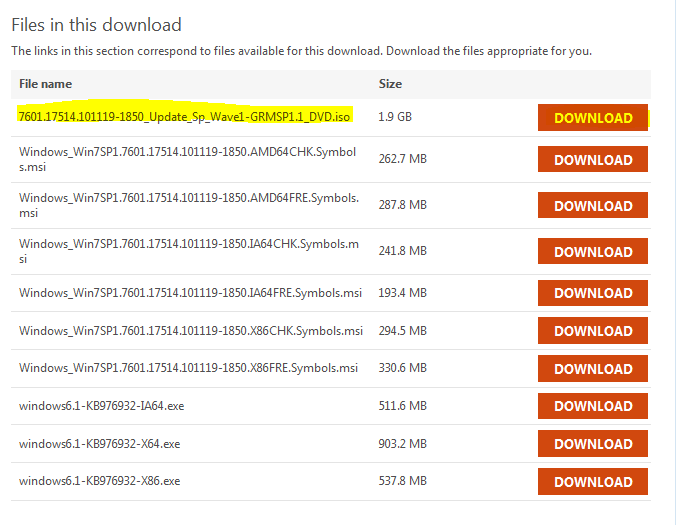
To get around this go to this link and download the the highlighted Service Pack 1 version (see below). Then mount the downloaded .iso image via Daemon Tools or any other image mounting application. You can also burn this image on a DVD.
Download this version.
After mounting the image and accessing the setup within, follow the onscreen instructions and allow the installation to finish. The setup will take approximately an hour to complete and your computer will restart a couple of time during the process.
After you have installed this service pack, the above error will go away.
Also make sure that your graphics card drivers are up-to-date. If not, then you can download the newest drivers from Nvidia or ATI's website, depending upon the make of your graphics card.
#2 Fatal DirectX Errors
There are two fatal DirectX errors that I have seen with Hitman: Absolution...
DXGI_ERROR_DEVICE_REMOVED and
E_OUTOFMEMORY
Bugger!
Both of these errors happen in-game and the game crashes afterwards. I have found that these errors are related to a faulty implementation of Screen Space Ambient Occlusion (SSAO), an advanced graphic rendering technique that calculates how light will bounce off of various graphics within a game. So you will have to turn it off in the graphics menu of Hitman: Absolution. For added stability, I also recommend to turn off the related Depth of Field option. Doing these two will make sure these in-game crashes are kept at bay. However, keep on a look out for a patch from the developers that addresses this issue.
You can access the graphics menu of Hitman: Absolution by selecting Options at the startup screen.
Turn off both these options for a crash free gameplay.
-----------------------------------
If you are experiencing a problem other than the ones listed then please feel free to leave a comment and I will look into providing a fix for it.
Hope this helps!
IF YOU WANT US TO WORK ON ERRORS IN OTHER GAMES, YOU CAN DO SO BY DROPPING A COMMENT BELOW!
Season 5 Coke Studio is back with was bang this summer and once again Rohail Hyatt knocked us all out with some killer tunes. Coke Studio really is proving to be a benchmark in Pakistani music, and further still in subcontinental music.
The first episode of this season of Coke Studio premiered on more than two dozen TV and Radio channels nationwide on Saturday, May 12th, and the season ended this July 7th. Here we will be looking at the best Coke Studio had to offer this season.
1. Charkha Nolakha
Atif Aslam collaborated with the upcoming rock band Qayaas to churn out a classic. This song is based upon Bulley Shah's kalam and with the level of Punjabi that exudes from it, captions come in real handy. Basically the track is about the preciousness of a dedicated life. Charkha means a spinning wheel while nolakha means priceless. Here charkha is figuratively used as life.
Atif Aslam carries the song really well and does justice to it. His co-vocalist, however, finds it difficult to carry this heavy Punjabi and sometimes fails to pronounce the word correctly. However, the music on the track is absolutely brilliant, especially the unique undertone of Led Zeppelin's Kashmir. Also, the track's tempo changing is impeccable.
This song can be termed as a fusion in the true sense as Atif Aslam's smooth tones are amalgamated with Jaswal's brazen vocals. The latter really adds great highs to the song with his rock screams. A must listen and I am not hesitant in saying this that it just might be the Alif Allah of this season.
2. Ishq Aap Bhi Awalla
The ultra-modern Meesha Shafi and the provincial Chakwal Group came together to give an enchanting performance in the second episode of the season. The group from the Salt Range give a haunting chorus of an account of a woman in love that is down by the stream to fetch some water. Add to it the contrasting style of Shafi's and you have a number that you can listen to repeatedly. This song is omnipresent at weddings in the region and Coke Studio's presentation aims at widening its popularity circle. I couldn't help but notice the group's ability to sing in an incessant unison, with nuances of each member's own distinct timbre.
For someone raised and educated in a city, Shafi does great justice to the Punjabi verses of the song and sings with just the right amount of ebb and flow.
3. Khabaram Raseeda
The acclaimed qawal duo of Farid Ayaz and Abu Muhammad returned these season and gave another rollicking performance. They sing with great verve and emotion and impart a physical meaning to this Persian kalaam of Amir Khusro's. The kalaam revolves around a worldly imagery of the beloved that is juxtaposed against the love for God. It is mesmerizing to listen and the alaaps manage to penetrate your soul, leaving you begging for more. A good part of the qawalli conjures up psychedelic images, speaking volumes about the singing prowess of the duo. Also the fact that the qawalli is 16 minutes long doesn't weigh on a listener. It's so soothing that it draws you into a cocoon of it's own, a cocoon where you temporarily severe your connection with the outside world. True sufism.
This kind of treatment of qawalli will do wonders in bringing its lost fame back as it is more geared towards the inclinations of the younger generation.
4. Pere Pavandi San
This was one of the most refreshing and interesting track of this season. It is based upon Shah Abdul Latif Bithai's poetic rendition of the famous Sindhifolk tale of Sassi and Punno. The poem talks about the frantic and painstaking search of Sassi for her newlywed groom, Punnu, who is intoxicated and taken away by his brothers to his abode in Makran, Baluchistan. The chorus is about Sassi's plight and how she is beseeching Punnu's brother to let him stay a night with her in Bhambore, Sindh. The piece of poetry can be thought of as a symbolic search of God.
Tahir Mithu's voice really adds to the beauty of this work and he syncs flawlessly with the funky tunes that are infused in this song. This song also speaks volumes about the sweetness and richness of the Sindhi language.
5. Nindya Ke Par
Uzair Jaswal, in recent months, have skyrocketed to the forefront of Pakistani music. The center piece of this achievement was his soulful number Tere Bin which has garnered over 2 million views on Youtube. A Coke Studio call seemed imminent and he didn't disappoint. Blending his romantic number with NFAK's evergeen, Tere Bin Nayi Lagda Dil Mera, proved an ultimate winner.
Jaswal's vocals, though a little on the higher side, complimented both tracks rather well. Especially, the last couple of minutes of Nindya Ke Par really reach out to the soul. I am sure a lot of wretched hearts will relate to the longing in Jaswal's voice.




 Posts
Posts


