Google recently released the 4.2.2 update of Android Jelleybean and with this returned the old problem of Google Play AppStore giving errors while updating or downloading applications. The most common error encountered by droiders is "Error retrieving information from server rpc:s-5:aec-0". There are two fixes for it.
#1 Remove and re-add your Google Account:
> Go to Settings and scroll down to the Accounts portion.
> Select Google accounts and tap on your email address. If you have more than one Google account for the same tablet then select the primary one with which you access the Play store.
> Now click on the Options button (the one with three vertically stacked dots) and select Remove account.
> Now proceed tor reboot your tablet
> Re-add the same account via the + Add account option in the Accounts section.
#2 Some service tweaking:
If #1 doesn't solve the problem then you will have to go a little deeper.
>Open the Settings menu and select the Apps option.
> Proceed to the All section here and scroll down and select Google Play Store.
> Force stop this app and then proceed to the Clear data.
> Repeat the same procedure with the Google Services Framework app.
> Reboot the tablet.
Note: You will have to repeat #1 after #2.
Showing posts with label Tech Tips. Show all posts
Tuesday, February 19, 2013
[Tech Tips] Google Play Download/Update Error Fix
Saturday, December 22, 2012
[Tech Tips] How to open Youtube in Pakistan without proxy?
Its been around 3 months since Youtube was banned in Pakistan, supposedly in the wake of the anti-Muslim film Innocence of Muslims. When the film's trailer got released a load of cavemen came bawling about on the street asking to block Youtube. The government, in its signatory response, decided to block access to Youtube for an indefinite period citing the presence of blasphemous content.
The radical conservatives whose actions catalyzed this extreme response, if researched, would make up only around 2-3% of Pakistan's internet populace. This goes on to show the disproportion of the government's response; shutting down access to the world's premier video sharing site where millions of Pakistanis used to watch educational and entertainment videos.
Well, this ban didn't only lead to negatives. There are some positives as well. The use of free internet proxies like Hotspot and Spotflux flourished in the country, effectively lending government's censorship drive rudderless. Also, local video sharing websites like Tune.pk sprang up much like how the ban on Facebook, back in 2010, lead to Muslim Facebook. However, these websites are an alternative at most, I don't think they will be able to keep up once Youtube is unbanned like MFB faded into obscurity once people had regained access to Facebook.
So, now let's get to the crux of the article, how to access Youtube without those slow and pesky proxy softwares. Hotspot for one, is hated, because they just bombard you with a hell load of ads meanwhile giving abysmal speeds. Spotflux is better, it is faster and doesn't have any weird advertisement windows popping up left and right. Still, nothing beats the convenience of circumventing the turning on proxy part for accessing Youtube - you don't have sit around waiting to connect to the proxy server!
I discovered this procedure by chance, it goes like this:
1) Right-click on the internet icon in the system icons portion of the taskbar. (highlighted in yellow)
2) Select Open Network and Sharing Center.
3) Select Local Area Network.
4) Click on the Properties button. Make sure you are the administrator of your computer before doing so.
6) Click on the Use the following DNS server addresses radio button, if not selected, and enter 8.8.8.8 and 8.8.4.4 in their respective fields. These are Google's own DNS servers. Press OK on this window and the one that was open before [the previous one would automatically come up one you press OK on the first one.].
7) Now the first part is done, in the second portion you will apply these DNS settings to your router. If you don't go through this step Youtube would open but not stream.
8) Open your router's setting page by typing your router's address in your browser window. I use PTCL's router which has the address 192.168.1.1. TP-Link routers have either the address 192.168.0.1 or 192.168.1.1.
9) Once you have entered the address you will be prompted for the username and password. If you haven't changed it, although it is recommended that you do, the combination will be admin/admin for both PTCL and TP-Link routers.
10) (for PTCL router) Then select Advanced Setup followed by DNS and enter the DNS addresses again. Save and reboot the router from Mangement.
11) (for TP-Link router) Go to DHCP then select DHCP settings. Enter 8.8.8.8 and 8.8.4.4 in the primary and secondary DNS fields respectively. Save and then restart your router.
Finally access Youtube using the https:// protocol like https://www.youtube.com.
Remember the simple http protocol won't work!
Enjoy, do let me know in the comments below how this panned out for you!
The radical conservatives whose actions catalyzed this extreme response, if researched, would make up only around 2-3% of Pakistan's internet populace. This goes on to show the disproportion of the government's response; shutting down access to the world's premier video sharing site where millions of Pakistanis used to watch educational and entertainment videos.
Well, this ban didn't only lead to negatives. There are some positives as well. The use of free internet proxies like Hotspot and Spotflux flourished in the country, effectively lending government's censorship drive rudderless. Also, local video sharing websites like Tune.pk sprang up much like how the ban on Facebook, back in 2010, lead to Muslim Facebook. However, these websites are an alternative at most, I don't think they will be able to keep up once Youtube is unbanned like MFB faded into obscurity once people had regained access to Facebook.
So, now let's get to the crux of the article, how to access Youtube without those slow and pesky proxy softwares. Hotspot for one, is hated, because they just bombard you with a hell load of ads meanwhile giving abysmal speeds. Spotflux is better, it is faster and doesn't have any weird advertisement windows popping up left and right. Still, nothing beats the convenience of circumventing the turning on proxy part for accessing Youtube - you don't have sit around waiting to connect to the proxy server!
I discovered this procedure by chance, it goes like this:
1) Right-click on the internet icon in the system icons portion of the taskbar. (highlighted in yellow)
2) Select Open Network and Sharing Center.
3) Select Local Area Network.
4) Click on the Properties button. Make sure you are the administrator of your computer before doing so.
5) Double-click on Internet Protocol Version 4 in the list.
6) Click on the Use the following DNS server addresses radio button, if not selected, and enter 8.8.8.8 and 8.8.4.4 in their respective fields. These are Google's own DNS servers. Press OK on this window and the one that was open before [the previous one would automatically come up one you press OK on the first one.].
7) Now the first part is done, in the second portion you will apply these DNS settings to your router. If you don't go through this step Youtube would open but not stream.
8) Open your router's setting page by typing your router's address in your browser window. I use PTCL's router which has the address 192.168.1.1. TP-Link routers have either the address 192.168.0.1 or 192.168.1.1.
9) Once you have entered the address you will be prompted for the username and password. If you haven't changed it, although it is recommended that you do, the combination will be admin/admin for both PTCL and TP-Link routers.
10) (for PTCL router) Then select Advanced Setup followed by DNS and enter the DNS addresses again. Save and reboot the router from Mangement.
11) (for TP-Link router) Go to DHCP then select DHCP settings. Enter 8.8.8.8 and 8.8.4.4 in the primary and secondary DNS fields respectively. Save and then restart your router.
Finally access Youtube using the https:// protocol like https://www.youtube.com.
Remember the simple http protocol won't work!
Enjoy, do let me know in the comments below how this panned out for you!
Sunday, December 16, 2012
[Tech Tips] Hitman: Absolution Crash Fixes
IF YOU WANT US TO WORK ON ERRORS IN OTHER GAMES, YOU CAN DO SO BY DROPPING A COMMENT BELOW!
Agent 47. Oh, how much we have missed you. Yes, the silent assassin is back but, unfortunately, with him are a load of crashes and glitches.
I will try to help you people get around the most common ones.
#1 "DirectX 11 failed to initialize"
Hitman: Absolution is one of the first games that actually requires Windows 7 Service Pack 1 to be installed on your machine in order to run the game. If you don't have this SP1 then when you double click the Hitman: Absolution shortcut\executable, this error pops up:
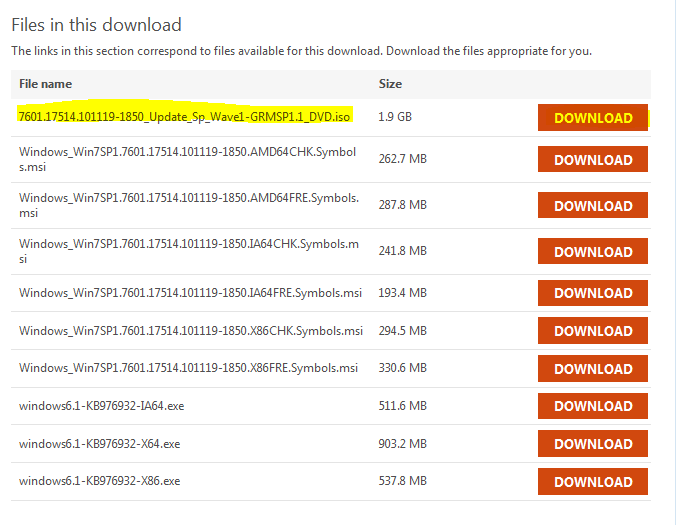
To get around this go to this link and download the the highlighted Service Pack 1 version (see below). Then mount the downloaded .iso image via Daemon Tools or any other image mounting application. You can also burn this image on a DVD.
After mounting the image and accessing the setup within, follow the onscreen instructions and allow the installation to finish. The setup will take approximately an hour to complete and your computer will restart a couple of time during the process.
After you have installed this service pack, the above error will go away.
Also make sure that your graphics card drivers are up-to-date. If not, then you can download the newest drivers from Nvidia or ATI's website, depending upon the make of your graphics card.
#2 Fatal DirectX Errors
There are two fatal DirectX errors that I have seen with Hitman: Absolution...
Both of these errors happen in-game and the game crashes afterwards. I have found that these errors are related to a faulty implementation of Screen Space Ambient Occlusion (SSAO), an advanced graphic rendering technique that calculates how light will bounce off of various graphics within a game. So you will have to turn it off in the graphics menu of Hitman: Absolution. For added stability, I also recommend to turn off the related Depth of Field option. Doing these two will make sure these in-game crashes are kept at bay. However, keep on a look out for a patch from the developers that addresses this issue.
-----------------------------------
If you are experiencing a problem other than the ones listed then please feel free to leave a comment and I will look into providing a fix for it.
Hope this helps!
IF YOU WANT US TO WORK ON ERRORS IN OTHER GAMES, YOU CAN DO SO BY DROPPING A COMMENT BELOW!
Agent 47. Oh, how much we have missed you. Yes, the silent assassin is back but, unfortunately, with him are a load of crashes and glitches.
I will try to help you people get around the most common ones.
#1 "DirectX 11 failed to initialize"
Hitman: Absolution is one of the first games that actually requires Windows 7 Service Pack 1 to be installed on your machine in order to run the game. If you don't have this SP1 then when you double click the Hitman: Absolution shortcut\executable, this error pops up:
| Download this version. |
After you have installed this service pack, the above error will go away.
Also make sure that your graphics card drivers are up-to-date. If not, then you can download the newest drivers from Nvidia or ATI's website, depending upon the make of your graphics card.
#2 Fatal DirectX Errors
There are two fatal DirectX errors that I have seen with Hitman: Absolution...
- DXGI_ERROR_DEVICE_REMOVED and
- E_OUTOFMEMORY
![]() |
| Bugger! |
| You can access the graphics menu of Hitman: Absolution by selecting Options at the startup screen. |
| Turn off both these options for a crash free gameplay. |
If you are experiencing a problem other than the ones listed then please feel free to leave a comment and I will look into providing a fix for it.
Hope this helps!
IF YOU WANT US TO WORK ON ERRORS IN OTHER GAMES, YOU CAN DO SO BY DROPPING A COMMENT BELOW!
Sunday, June 17, 2012
[Tech Tips] Max Payne 3 Crash Fixes
IF YOU WANT US TO WORK ON ERRORS IN OTHER GAMES, YOU CAN DO SO BY DROPPING A COMMENT BELOW!
So it has been over eight years since we last blasted thugs and munched pain-killers with the gritty Max Payne and finally the third edition of the acclaimed series is out. It is getting rave reviews everywhere and after playing the first few chapters (obviously after overcoming the hell load of crashes and errors), I, too can vouch for the veracity of these reviews. MP 3 is one hell of a game.
Sadly though, there have been a lot of problems encountered by people while trying to play the cracked version of this game. Lets look into solving them so that you don't have to wait a while longer to get into Max's shoes!!
#1 Game crashes on double-clicking the executable or doesn't start at all. Or starts checking for updates.
These kind of errors/crashes are caused by the game checking online for the authenticity of your installation and subsequently looking for updates. Well, you don't have the original game, so it crashes understandably.
To counter this:
#2 The game hangs on main screen and then crashes. (Link Fixed)
This is a fairly simple hurdle to overcome. It is caused by the absence of or the absence of the correct version of Rockstar Games Social Club (who the hell needs it anyway!). The required version is 1.0.9.5 and can be found here (pass: relegated007).
#3 The game crashes/goes non-responsive during or after the first chapter.
This is a technical fault that somehow got overlooked during beta-testing. A patch was released within a few days of the launch of the game to address this issue. Install Update 1 (1.0.0.22) if you have got the initial version (1.0.0.17). You can download it from here (pass: black-load.blogspot.com).
You might have to replace the files manually (copy and paste).
#4 You get "The dynamic library gsrld.dll failed to load..." error upon clicking the executable.
Link Updated February 22, 2014
The EmbedUpload link provides you a list of filehosts where this file is live. I'd recommend BillionUploads or Uptobox for download. If you are facing problems try copy-pasting the link EmbedUpload provides rather than clicking it because then a couple of windows open and if you have a pop-up blocker on your browser then the link to the actual filehost may not open.
There were some issues with the initially released Reloaded crack and you can get this error on some machines. Download this fixed crack instead (pass: relegated007) and overwrite the existing one. Some other files will have to be replaced too.
#5 Error\Failure in Profile Creation
Follow the procedure in #2 and then move on to #4.
These were the errors that I encountered myself and have thus posted the solutions for them after working them out. If you are experiencing a problem other than the ones listed then please feel free to leave a comment and I will look into providing a fix for it.
Hope this helps!
IF YOU WANT US TO WORK ON ERRORS IN OTHER GAMES, YOU CAN DO SO BY DROPPING A COMMENT BELOW!
So it has been over eight years since we last blasted thugs and munched pain-killers with the gritty Max Payne and finally the third edition of the acclaimed series is out. It is getting rave reviews everywhere and after playing the first few chapters (obviously after overcoming the hell load of crashes and errors), I, too can vouch for the veracity of these reviews. MP 3 is one hell of a game.
Sadly though, there have been a lot of problems encountered by people while trying to play the cracked version of this game. Lets look into solving them so that you don't have to wait a while longer to get into Max's shoes!!
#1 Game crashes on double-clicking the executable or doesn't start at all. Or starts checking for updates.
These kind of errors/crashes are caused by the game checking online for the authenticity of your installation and subsequently looking for updates. Well, you don't have the original game, so it crashes understandably.
To counter this:
- Add both PlayMaxPayne3.exe and MaxPayne3.exe to your firewall's (Windows, Zone Alarm, ESET etc) blocked list. Don't allow them to communicate over the internet.
| You get this dialog if your game is trying to access the internet. |
- Well I can't list specific procedures for the whole lot of these firewalls so you just google your query and you will get a good bunch of tutorials.
- As a quick tip, however you can switch your third-party firewall to interactive filtering mode and then double-click on the PlayMaxPayne3.exe.
- Your firewall will now ask for your consent, you should disallow the communication for both the executables and then make it remember your choice as a rule (there is normally a checkbox there for this option).
| An example screen shot of an interactive firewall filtering prompt (you obviously have nothing to do with the Bing Client :p). |
- If all goes well then you will see the following dialog on your screen.
- Click Offline Mode to play!
#2 The game hangs on main screen and then crashes. (Link Fixed)
This is a fairly simple hurdle to overcome. It is caused by the absence of or the absence of the correct version of Rockstar Games Social Club (who the hell needs it anyway!). The required version is 1.0.9.5 and can be found here (pass: relegated007).
![]() |
| This is MP 3's main screen. If you don't have the correct RGSC application installed, you won't get past here. |
- Install this version.
- After you have installed this go to: C:\Users\User_Name\Documents\Rockstar Games\Social Club\profiles and make sure that you have these two things there:
| This folder (folder name might be different) and .dat file should be there in the profile folder for the game to work. |
- If not then go to your Max Payne 3 installation directory (the one with the executables in it), there is a copy of the profile folder there. Copy its contents to the previously mentioned location.
#3 The game crashes/goes non-responsive during or after the first chapter.
This is a technical fault that somehow got overlooked during beta-testing. A patch was released within a few days of the launch of the game to address this issue. Install Update 1 (1.0.0.22) if you have got the initial version (1.0.0.17). You can download it from here (pass: black-load.blogspot.com).
You might have to replace the files manually (copy and paste).
#4 You get "The dynamic library gsrld.dll failed to load..." error upon clicking the executable.
Link Updated February 22, 2014
The EmbedUpload link provides you a list of filehosts where this file is live. I'd recommend BillionUploads or Uptobox for download. If you are facing problems try copy-pasting the link EmbedUpload provides rather than clicking it because then a couple of windows open and if you have a pop-up blocker on your browser then the link to the actual filehost may not open.
#5 Error\Failure in Profile Creation
Follow the procedure in #2 and then move on to #4.
These were the errors that I encountered myself and have thus posted the solutions for them after working them out. If you are experiencing a problem other than the ones listed then please feel free to leave a comment and I will look into providing a fix for it.
Hope this helps!
IF YOU WANT US TO WORK ON ERRORS IN OTHER GAMES, YOU CAN DO SO BY DROPPING A COMMENT BELOW!
Saturday, July 09, 2011
[Tech Tips] Metro 2033 Crash Fix
Well those Ukrainians are sure masters at producing post-apocalyptic gaming titles and Metro 2033 is no exception following the footsteps of the hit S.T.A.L.K.E.R series. I didn't play this game when it came out last year and just casually downloaded it around a week from now and I was in for a surprise...the game won't work past the main menu or when you were lucky enough to load a mission (it crashed on the loading screen). I was damn irritated as nothing would fix this issue despite me having all the firepower to run this game at its max.
And then I discovered the fix :).
> Download the Metro2033_fix file. Use 'relegated007' as the password.
> Install Metro 2033 fix.exe (which is basically a v1.1 patch).
> Copy the contents of the crack folder into your main Metro 2033 folder (the one with the executable in it)
> Run the game, tweak the settings the way you want but remember to disable "Advanced Physics". Your game might crash to the desktop after or during the saving of the settings. Repeat the process if it occurs in between your work, remembering to start in "Safe Mode". (the game will automatically display a dialog after you start the game launcher after a crash)
> After you have played with the settings..play the game!!
Note: The game will still crash on normal mode. This fix works by providing you a safe mode that is 'crash proof'. So you will have to start the game twice each time you wanna play it. Well it is better than not playing the game at all, isn't it?
I hope this helps. :)
IF YOU WANT US TO WORK ON ERRORS IN OTHER GAMES, YOU CAN DO SO BY DROPPING A COMMENT BELOW!
And then I discovered the fix :).
> Download the Metro2033_fix file. Use 'relegated007' as the password.
> Install Metro 2033 fix.exe (which is basically a v1.1 patch).
> Copy the contents of the crack folder into your main Metro 2033 folder (the one with the executable in it)
> Run the game, tweak the settings the way you want but remember to disable "Advanced Physics". Your game might crash to the desktop after or during the saving of the settings. Repeat the process if it occurs in between your work, remembering to start in "Safe Mode". (the game will automatically display a dialog after you start the game launcher after a crash)
> After you have played with the settings..play the game!!
Note: The game will still crash on normal mode. This fix works by providing you a safe mode that is 'crash proof'. So you will have to start the game twice each time you wanna play it. Well it is better than not playing the game at all, isn't it?
I hope this helps. :)
IF YOU WANT US TO WORK ON ERRORS IN OTHER GAMES, YOU CAN DO SO BY DROPPING A COMMENT BELOW!
[Tech Tips] Dirt 3 'Season 2 Won't Unlock' Fix
Well this Dirt 3 is sure a good game but it is giving the players who use cracks a hard time (much like that frikkin' Batman: Arkham Asylum).
Recently a few of the people that used my original Dirt 3 fix pointed out that they can't continue beyond Season 1 and into Season 2.
I found two reasons for this issue...
1. You don't have a podium finish in the Season 1 finale.
In this case replay the event.
2. It is some sort of an anti-crack protection.
This technique was initiated by Rocksteady and implemented in that Batman: Arkham Asylum game in which players that haven't legally bought the title can't continue past certain points during the gameplay (although all had some potential workarounds ;P). I guess Codemasters are trying to do the same but you can evade this too.
> Goto C:\Program Files\Codemasters\Dirt 3\database or a variant path.
> Find a file name database_restrictions.xml (This file basically governs the locked stuff in the game and when it is to be unlocked)
> Move it to a folder other than Codemasters.
> Start the game with my original fix.
> After you have loaded your save game the game will ask you that do you want to unlock all the cars and stuff. Select No. (Selecting Yes will lead to complications later on, including crashes, as some of the stuff that has been unlocked is DLC that isn't actually present in the game installation!!)
> Continue your tour!
I hope this helps. :)
IF YOU WANT US TO WORK ON ERRORS IN OTHER GAMES, YOU CAN DO SO BY DROPPING A COMMENT BELOW!
Recently a few of the people that used my original Dirt 3 fix pointed out that they can't continue beyond Season 1 and into Season 2.
I found two reasons for this issue...
1. You don't have a podium finish in the Season 1 finale.
In this case replay the event.
2. It is some sort of an anti-crack protection.
This technique was initiated by Rocksteady and implemented in that Batman: Arkham Asylum game in which players that haven't legally bought the title can't continue past certain points during the gameplay (although all had some potential workarounds ;P). I guess Codemasters are trying to do the same but you can evade this too.
> Goto C:\Program Files\Codemasters\Dirt 3\database or a variant path.
> Find a file name database_restrictions.xml (This file basically governs the locked stuff in the game and when it is to be unlocked)
> Move it to a folder other than Codemasters.
> Start the game with my original fix.
> After you have loaded your save game the game will ask you that do you want to unlock all the cars and stuff. Select No. (Selecting Yes will lead to complications later on, including crashes, as some of the stuff that has been unlocked is DLC that isn't actually present in the game installation!!)
> Continue your tour!
I hope this helps. :)
IF YOU WANT US TO WORK ON ERRORS IN OTHER GAMES, YOU CAN DO SO BY DROPPING A COMMENT BELOW!
Sunday, June 05, 2011
[Tech Tips] Dirt 3 'Profile Save' Error Fix
DiRT3 has been out for more than a week now. It has been getting positive ratings all over the internet and racing fans and avid gamers want to get a taste of it.
But as it pans out there has been somewhat of a glitch as soon as you start DiRT3; even after you have logged into your Games for Windows Live (GFWL) account DiRT3 won't create a save profile for you and will give you an error that profile creation failed. Stop here!! You don't want to make any progress on the events when you can't save it because although the games runs along after this initial message but you can't save your progress unless and until a profile is availalbe.
There can be two reasons for this problem.
#1 You use Windows in a different language or have a user name in a language other than English.
I don't know why but Unicode characters in your Windows username somehow interfere with DiRT3 creating a 'Save Game' folder for you.
You can solve this problem by creating a Windows account with a name that is in English. I would suggest you copy and paste 'Dirt 3' (without the commas) into your username field. It would fix the problem.
#2 There is a problem with your crack.
Links updated September 14, 2013
A team/person called Netshow released a crack for DiRT3 before any of the respectable crackers like Reloaded or Skidrow could release a fix. And as it turns out the crack by Netshow has some problem with making the game create a Profile for you.
To fix it it download the archive DiRT3_fix, use relegated007 as password and extract it in the game folder (C:\Program Files\Codemasters\Colin McRae DiRT 3 or a variant), replacing any existing files.
Now use dirt2.original to start the game and it will run fine.
If the original fix fails to work for you then download my Extended_DiRT3_fix and use relegated007 as the password.
I hope this helps. :)
IF YOU WANT US TO WORK ON ERRORS IN OTHER GAMES, YOU CAN DO SO BY DROPPING A COMMENT BELOW!
But as it pans out there has been somewhat of a glitch as soon as you start DiRT3; even after you have logged into your Games for Windows Live (GFWL) account DiRT3 won't create a save profile for you and will give you an error that profile creation failed. Stop here!! You don't want to make any progress on the events when you can't save it because although the games runs along after this initial message but you can't save your progress unless and until a profile is availalbe.
There can be two reasons for this problem.
#1 You use Windows in a different language or have a user name in a language other than English.
I don't know why but Unicode characters in your Windows username somehow interfere with DiRT3 creating a 'Save Game' folder for you.
You can solve this problem by creating a Windows account with a name that is in English. I would suggest you copy and paste 'Dirt 3' (without the commas) into your username field. It would fix the problem.
#2 There is a problem with your crack.
Links updated September 14, 2013
A team/person called Netshow released a crack for DiRT3 before any of the respectable crackers like Reloaded or Skidrow could release a fix. And as it turns out the crack by Netshow has some problem with making the game create a Profile for you.
To fix it it download the archive DiRT3_fix, use relegated007 as password and extract it in the game folder (C:\Program Files\Codemasters\Colin McRae DiRT 3 or a variant), replacing any existing files.
Now use dirt2.original to start the game and it will run fine.
If the original fix fails to work for you then download my Extended_DiRT3_fix and use relegated007 as the password.
I hope this helps. :)
IF YOU WANT US TO WORK ON ERRORS IN OTHER GAMES, YOU CAN DO SO BY DROPPING A COMMENT BELOW!